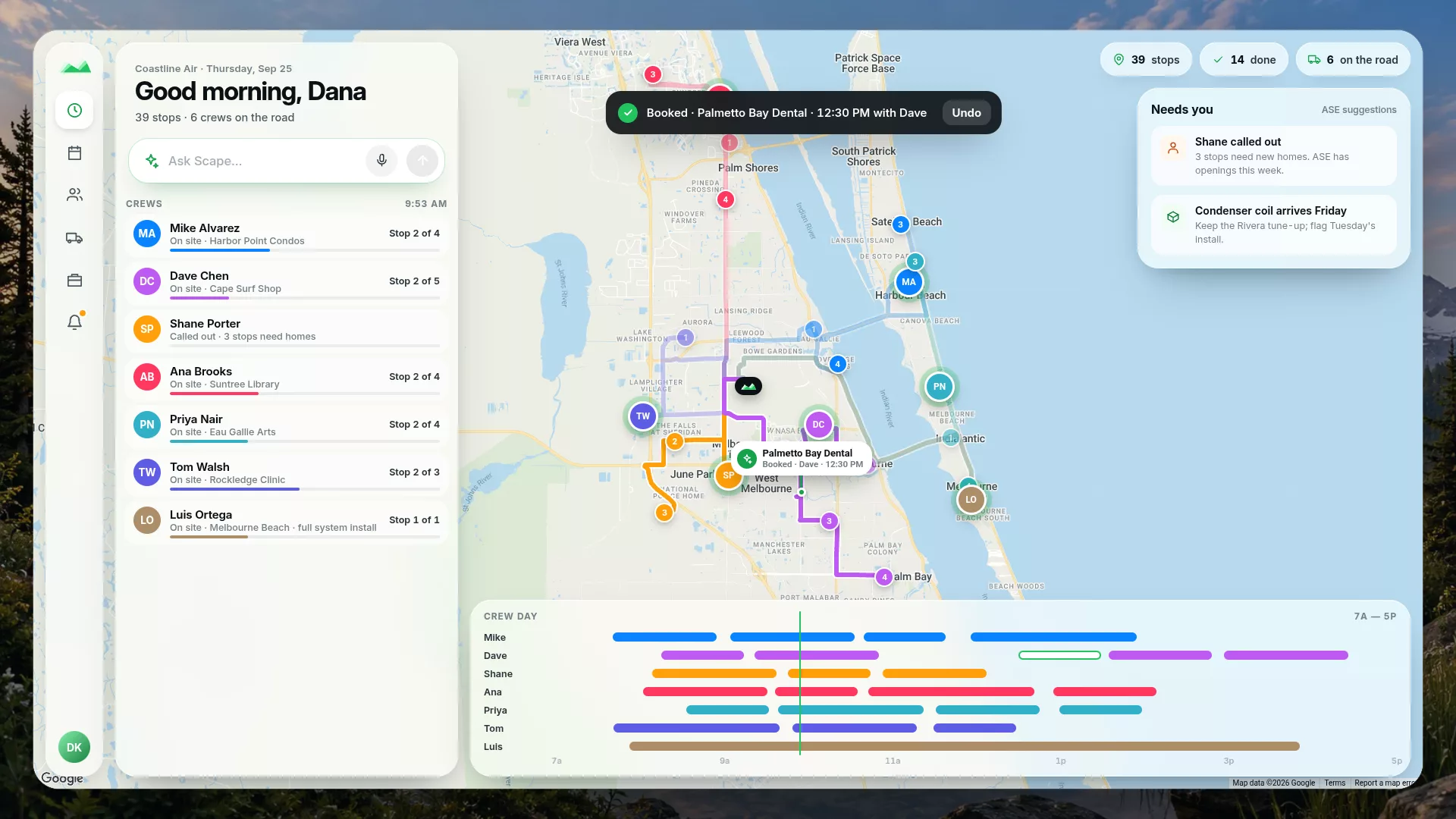
“Shane called out. Reschedule his stops.”
Scape answers with the stops it would move and the openings ASE found for each — then waits for your Confirm.
ASE is the scoring layer underneath Scape's schedule. It does the math — who's qualified, who has room, what the route can actually promise — and hands you the obvious choice. Then it gets out of your way.
The helper, not the gate. The schedule is yours; ASE just makes the smart pick easy to see.
One sample service day on real roads. The slate line is the day in its original order; the green line is the order ASE proposed for the same stops. Both are timed by the same road estimate, on one shared clock.
Estimated drive time from Google road data, one way from the start through the last stop — no return leg. Service and waiting time are not included, so less driving alone doesn't promise an earlier finish. Fictional customers on real roads; no customer data.
Every scheduling tool eventually meets a customer with a weird Tuesday. Most of them block. ASE scores it, tells you what it sees, and lets you save it anyway.
ASE never disables a button. It advises, never blocks.
If a worker isn't qualified, you can still assign them — ASE just flags it. If a stop runs past end of shift, you can still save it — ASE shows the overrun. Holiday, weekend, an odd window the engine doesn't recognize? The schedule still saves. You know your business better than any engine does, and ASE is built to respect that.
No "no worker available" dead ends. ASE returns the best option it can find and tells you why — qualifications, availability, geography, room left in the day.
Every suggestion moves in one drag. Drop it somewhere else, override the pick, undo it — ASE learns your preferences over time, but it never forces them on you.
No silent moves, no quiet date changes, no "we fixed it for you" surprises. Every change to your schedule starts with something you did — a drag, a Reschedule, a Cascade.
A good scheduling call has three honest parts. ASE's whole job is to make each one true before it suggests anything.
Workers whose start date is on or before the visit, who aren't on leave, whose weekly availability covers the day, and who are qualified for the service. A crew counts as one assignable unit; a solo tech counts as one person's minutes.
Hours on shift, minus daily overhead, minus a safety buffer you set, minus the drive between stops. No make-believe minutes. If a crew is tight, ASE says so before you add to it — not after the day falls apart.
ASE checks the customer's time window against real drive distances, the business-open anchor, morning prep, and lead time — then shows whether the promise holds or it's a stretch. You decide what to commit to.
Because ASE never edits your schedule behind your back, the numbers on the dashboard match what's actually going to happen. Capacity is counted the boring, real way.
Per-day room is work hours times the crew on shift, minus daily overhead, minus your safety buffer, minus travel between stops. If the dashboard says four service days of buffer this month, you have four service days of buffer.
ASE projects every recurring visit across the horizon — weekly Tuesdays, monthly on the 8th, whatever the cadence — minus blackouts, skips, and completed work. Gaps show up on the dashboard before a customer ever notices one.
ASE scores once and shows its work. There's no iterative replan churning in the background, no convergence loop, no engine quietly second-guessing what you already decided.
We scaled the engine back in May 2026 after autonomous date moves turned into a flag-repair-flag-repair loop. Now every change is small, explicit, and started by you.
A crew is two hours behind. The dispatcher taps Cascade on the Schedule. Here's exactly what happens — no autonomy, no surprises.
ASE starts from server time, rounded up to the next whole minute, so the first moved stop is always in the future when it applies.
The earliest unstarted, unlocked stop for that crew. Locked stops stay put; if one would be overrun, ASE surfaces it for you to sort out.
It works out the gap — delta = now − earliest stop time — and pushes every shiftable stop forward by exactly that much. That's the whole core.
Anything that now lands past end of shift is offered to the next workday. You approve or dismiss it. Overflow lands once — it never chains further out.
A worker calls out. Tell Scape AI, and ASE finds the next openings for every stop on that worker's day. You see each move before anything changes.
Speak or type it in the Scape AI bar: “Reschedule Shane's stops.” Or cancel the day instead: “Cancel Shane's stops today.”
Each stop gets a proposed new day and time from ASE. If ASE is switched off or set to Manual, Scape uses the next calendar day and tells you so.
Scape lists each stop and where it would land. Nothing is written until you tap Confirm.
A rescheduled or cancelled day can be undone from the same place.
“Shane called out. Reschedule his stops.”
Scape answers with the stops it would move and the openings ASE found for each — then waits for your Confirm.
ASE does the scheduling math and shows you the smart pick — then leaves the call to you. Run it on your real schedule for two weeks and see how a quieter, more honest engine feels.
Two-week Team trial · secure Stripe checkout · questions go to [email protected]