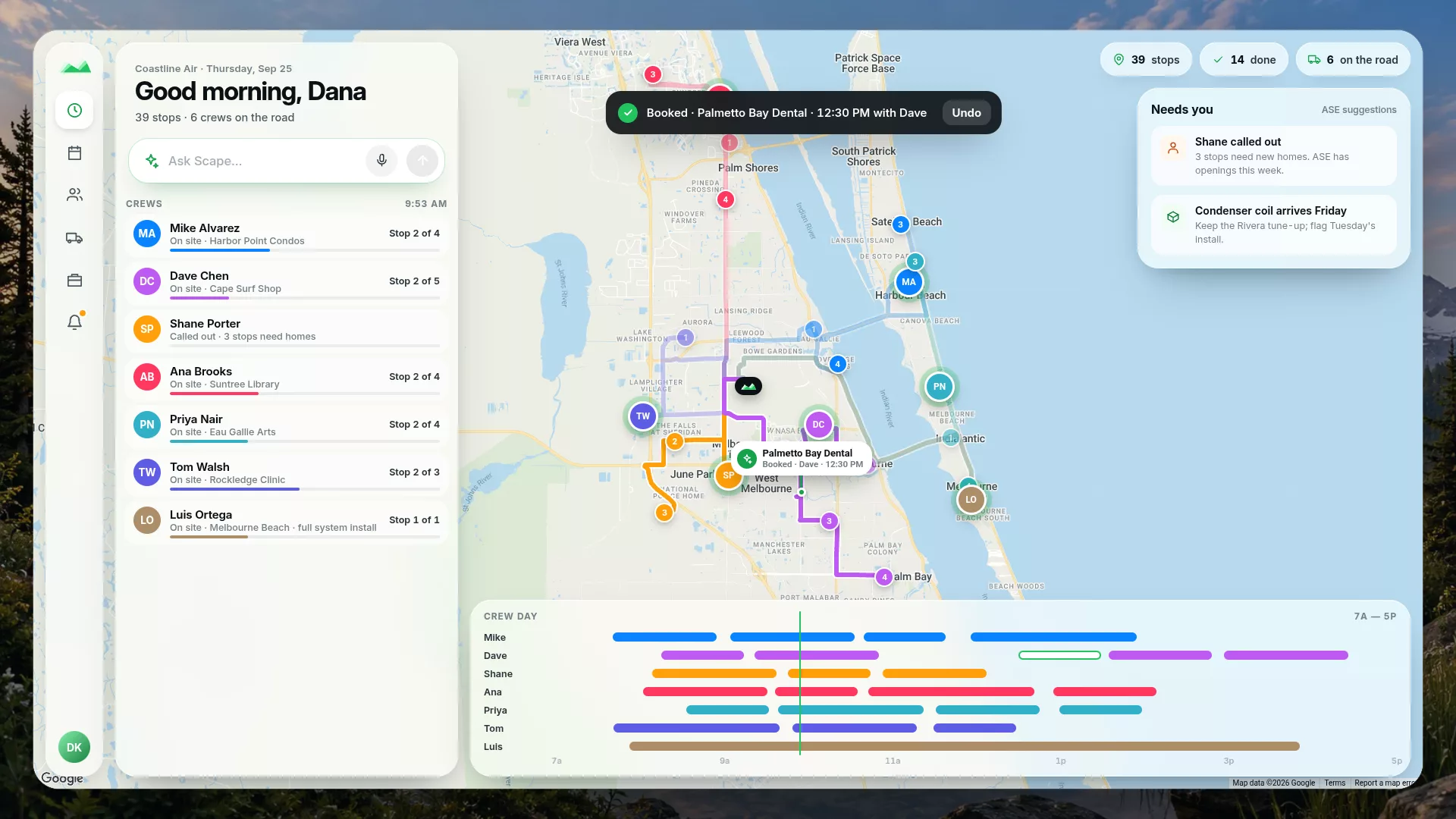
“Book Dave for Harbor Point tomorrow at two.”
Scape drafts the stop — customer, day, time, and who's going — and waits for your Confirm. Undo afterward if plans change.
Give Scape AI instructions in plain English. Review the change, and get back to the job.
14-day Team trial through secure Stripe checkout. Cancel any time.
Scape AI turns a plain-English request into the actual change in your schedule — shown to you before anything is saved. Fewer fields to fill, fewer screens to switch between.
Tap the microphone and say it, or type it. Dictation fills in the request — you press Send when it reads right.
Scape answers with the real proposal — the stop it would book, or the stops it would move. Correct it in plain words: “Actually, make it three.” Nothing is saved until you tap Confirm.
Confirmed work lands on Today and the Schedule. Changed your mind? Undo is right there for a booked stop or a cancelled or rescheduled day.
“Book Dave for Harbor Point tomorrow at two.”
Scape drafts the stop — customer, day, time, and who's going — and waits for your Confirm. Undo afterward if plans change.
“Shane called out. Reschedule his stops.”
Scape lists every stop it would move and where, using ASE's next openings. Confirm to move them; Undo puts them back.
“Where's the trailer?”
Scape answers from your asset records, with a link to move it in Assets. Lookups never change anything.
Also handles “What's on today?”, cancelling a worker's day, and quick reports like last week's revenue. Included on every plan: owners, admins, and dispatchers can make changes; field workers can look things up. Replies appear on screen as text and cards. Not available for organizations using Scape's medical mode.
The Conflict Center checks every crew, rental, subcontractor, and inspection, and runs the routine fixes on autopilot. The Messaging Center keeps every text and email with subs, customers, and suppliers in one place — and Scape handles most of them for you.
“Scape, go ahead with the routine fixes.”
Scape texts subs, customers, and suppliers in parallel and re-plans when someone says no. A yes isn’t proof: a blocker turns green only on a check-in, a matching photo, or a passed inspection. Anything that costs money waits for you.
“Can you come earlier than 11?”
One inbox for every conversation, threaded by job. Scape reads the replies and updates the schedule, drafts answers for you to send, and only flags the ones that need you.
Previews of features in development. Fictional company and data.
One sample service day on real roads. The slate line is the day in its original order; the green line is the order ASE proposed for the same stops. Both are timed by the same road estimate, on one shared clock.
Estimated drive time from Google road data, one way from the start through the last stop — no return leg. Service and waiting time are not included, so less driving alone doesn't promise an earlier finish. Fictional customers on real roads; no customer data.
ASE scores who fits, who has room, the drive time, and the customer window — then hands you the obvious choice. It advises, never blocks.
A dispatcher needs an honest view of the day — who's where, what's promised, and what's about to slip. Scape keeps scheduling, routes, crews, customers, and billing on the same screen.
Recurring stops, one-off jobs, who's qualified, how long it takes, and what it does to the route — all visible before you commit.
ASE suggests the order and the right crew, explains the trade-off, and leaves the final call to you.
Crew location, arrivals, stop progress, and the note that went to the customer — they travel together, so nothing gets lost.
Finished work becomes a service record, and that record carries straight into billing and QuickBooks.
The office and the crew work from the same day. Each sees what their job needs.
Owners and dispatchers see every route, ASE's suggestions, and what's at risk — and make changes with Scape AI in a sentence.
Field workers get their own day with the details they need at the door. Scape AI answers their questions; schedule changes stay with the office.
Scape is built as one product, not a bundle. Mileage and material inventory are not side apps to wire together later — they are Scape workflows, built into the place where scheduling, crews, customers, and billing already meet.
A focused product makes sharper decisions than a shelf of disconnected apps. Scape gets dedicated product attention inside Modulus, so the workflows teams use every day keep getting tighter.
Drive time gets logged against the route and the customer it belongs to, so reimbursement and reporting line up without a second app.
Track what's on the shelf and on the truck, what a job used, and when it's time to reorder — without leaving the schedule.
A four-minute tour of the whole workflow: scheduling, routing, live tracking, equipment, the field app, projects, customers, and billing. Jump to any chapter.
One product, three plans. Every plan includes users — add more anytime for $15 per user per month — and Scape AI. No long contract to sign.
For an owner-operator getting off spreadsheets and sticky notes.
For a small field team running daily routes together.
For larger operations that need deeper integrations and hands-on support.
Scape is built by Modulus Software — a custom software consulting firm and product studio led by an engineer who spent almost 25 years in defense and aerospace systems where reliability was not optional. The same team that builds Scape takes on consulting engagements for operations-heavy businesses.

Tell us how your routes, crews, and customers work. We'll give you a straight answer on whether Scape's the right tool — and we'll say so if it isn't.
Start a 14-day Team trial, or put Scape on your phone.

 Scan to install on your phone